Product Design · Information Architecture
Getting out of the way
To add a major new capability to the tool pathologists diagnose cancer in, the real work wasn’t adding — it was taking things away, so the one thing that mattered was the first thing a pathologist saw.
- Context
- I lead UX for navify Digital Pathology, Roche’s digital pathology platform — FDA-cleared for primary diagnosis and CE-IVD marked — where pathologists read whole-slide images to diagnose cancer. We needed the viewer to take on a significant new capability.
- Problem
- Layered onto an already-dense screen, that capability made it genuinely hard for a pathologist to be sure of exactly what they were looking at — ambiguity that, in diagnosis, is a safety risk.
- What I did
- Rather than adding, I made the case for taking away: I proposed redesigning a whole section of the viewer, pulled roughly 70% of the clutter off the top level into a clear hierarchy, and made the right things lead by default.
- Outcome
- A clearer viewer that tested better than anything we’d tried before — built on a simple rule: keep what the pathologist needs on hand, and put everything else away until it is.
Role: UX Design Lead, navify Digital Pathology (Roche, via Concord).
The task
navify Digital Pathology is the viewer pathologists work in to read whole-slide images and reach a diagnosis. The job in front of us was to give that viewer a significant new capability — a real expansion of what it could do.
The problem
The trouble wasn’t the new capability itself; it was where it had to live. The screen was already dense — years of useful additions, each earning its spot at some point — and the new capability added more layers of related-but-distinct information to the same screen at once. Those layers resemble each other, which makes it easy to mistake one for another without noticing.
In most software, that kind of ambiguity is friction. In a diagnostic tool it’s a safety issue: the pathologist has to be sure of exactly what they’re looking at to read it correctly. Clarity here wasn’t polish; it was a requirement.
Why that’s hard to fix
The answer turned out to be subtraction — but that wasn’t obvious at first, and it’s the hard kind of fix, not for technical reasons. We’re invested in every feature, every detail, every interaction; we know the real use case behind each one. So does everyone: design, engineering, and the business all champion the parts they shipped. Burying anything feels like withholding value someone worked hard to create — which makes pruning not just an emotional decision but a political one. It’s the instinct to keep every tool out on the bench in case you need it — until the one you’re reaching for is lost among the ones you’re not.
The false start
So we did what that instinct suggests: we tried to add our way to clarity — building out more structure to keep things distinct and signal what was what. On paper it should have worked. In practice, every time we dug in it got more crowded and more confusing, not less. We were asking the tool to do more, and the pathologist was the one absorbing the cost.
The turn
It was the repetition that finally forced the step back: when variation after variation on “more structure” failed the same way, the problem clearly wasn’t the execution — it was the approach. We had the job backwards. A pathologist is a doctor making a high-stakes call: you’d never expect a surgeon to hunt for a scalpel. What they need is there and ready — exactly when and where they reach for it, not buried in a pile of tools or slow to arrive. A pathologist deserves the same. That’s what the viewer had to become: not a tool that shows everything it can do, but one that surfaces precisely what the moment calls for and stays out of the way the rest of the time.
What I did
That reframe was bigger than a cleanup, so I proposed it as one: stepping back to redesign a whole section of the viewer, because the same problems kept resurfacing and only a structural change would hold. The work came down to three moves.
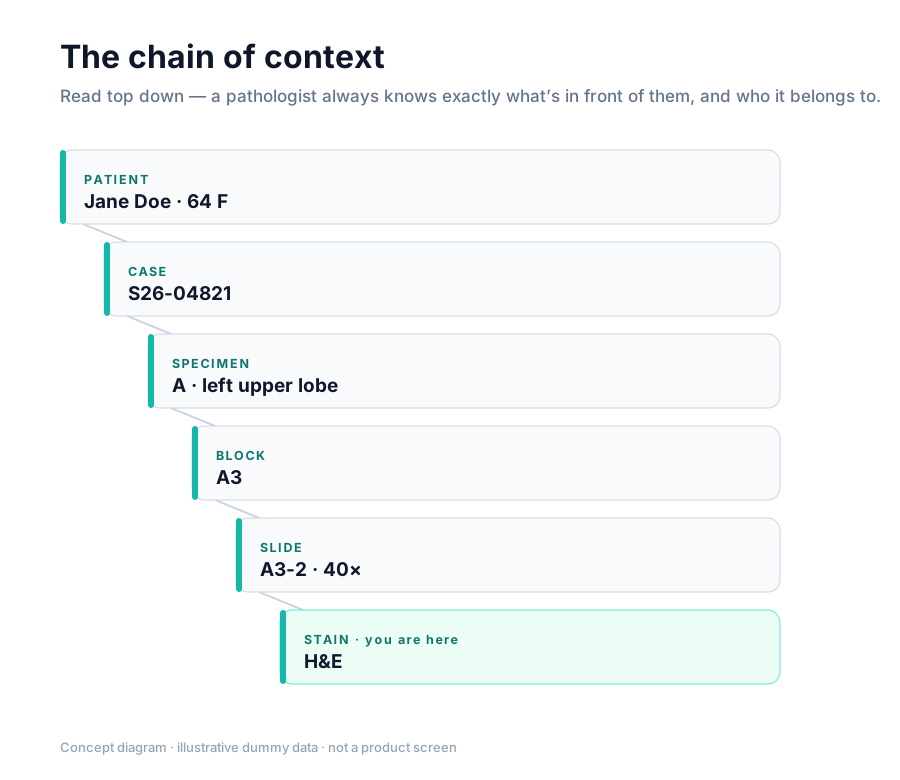
Restore the chain of context. A pathologist has to know, without thinking about it, exactly what’s in front of them and who it belongs to. I rebuilt the hierarchy so it reads top down — patient, case, specimen, block, slide, stain — so that lineage is always legible at a glance and you never lose track of where you are.
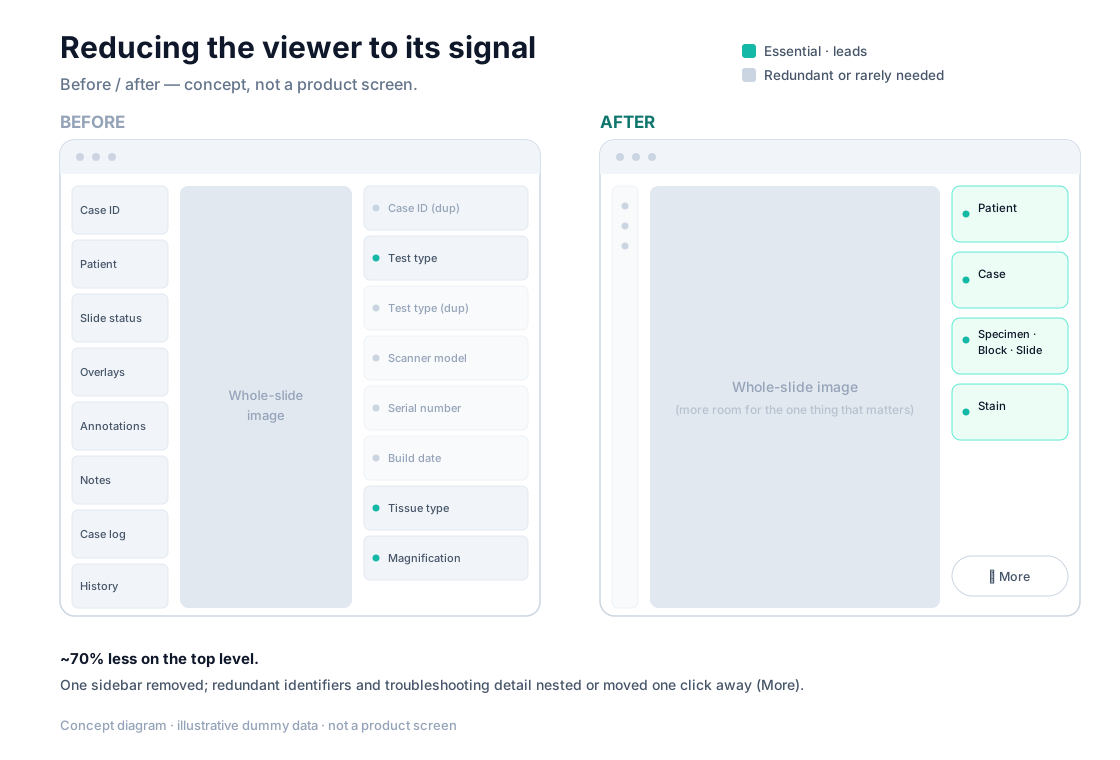
Demote what doesn’t lead. Clarity came from hierarchy, not deletion. I removed one sidebar outright, then took most of what remained off the top level — nesting it beneath the things that actually lead, and moving the rarely-needed detail (the kind you reach for only when something’s wrong) a click away. All told, the top level carried about 70% less than before. Little of it was useless; it just didn’t belong competing for first attention.
Make the right hierarchy the default. Here’s the counterintuitive part. The existing design was actually quite customizable — pathologists could rearrange the layout freely, and they liked that. But that freedom was really a workaround: because nothing had an inherent order, they were using it to drag the pieces into the hierarchy they needed themselves. Years of pathologist research — the evidence base we’d been building all along — had made that hierarchy unambiguous. So I built it in by default and limited customization to within each tier. We’d been handing pathologists the cleaning supplies and praising them for tidying the room; this just cleaned the room for them.
Where it landed
The team was skeptical until they saw it. Once the redesign was in front of them, how cluttered the old way had been was obvious — and in formative testing with pathologists it tested better than anything we’d produced before. The version that won was the less customizable one, and that was the point: pathologists no longer needed the freedom to fix the layout, because the layout was finally right to begin with. It’s the direction the viewer is being built on now.
The principle
The whole point of the viewer is to see the image. So that became the rule: keep the focus on the slide, and anything that competes with it has to earn its place by serving an immediate purpose. If it doesn’t, it isn’t neutral — it’s a net negative, a small tax on the one task that matters.
What I learned
This one changed how I design. When a tool is your whole product, it’s easy to treat it as the center of the user’s world. But for a pathologist the viewer is just one instrument in a long day — most of their time goes to the image itself, then to reporting, and rarely to anything else inside the tool. That reframed the goal for me: the viewer earns its keep by staying quiet and bringing something forward only at the moment it actually helps.
Some specifics are abstracted for confidentiality.
Ask a follow-up
Questions about this project?
Ask the assistant anything about “Getting out of the way” — it answers from this case study.
AI assistant — answers from Samuel's case studies and background. May be imperfect. Chat transcripts may be recorded and saved to improve the site.